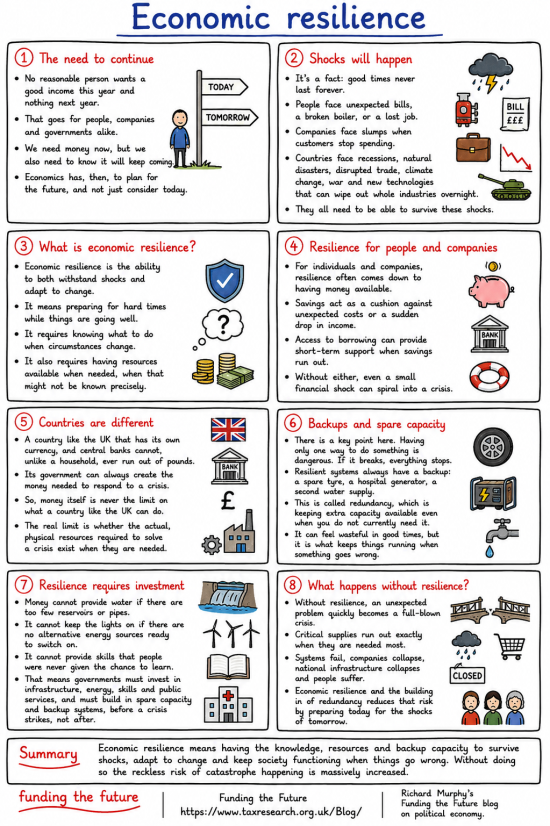
How to expand this image
If you press CTRL or Command and the Plus (+) key on your keyboard, your browser should increase the size of your page every time you do this. Press CTRL or Command and the 0 (zero) key together to restore the screen to normal.
How to download this image.
If you right-click the image, you should be given the option to download it to your computer. So long as you do so without the intent to make a profit, you may do so without further permission. Commercial use requires consent. But if you just want to share it, do so with whoever and wherever you want. That is the purpose of these infographics.
The image library
We have a library of these images. It is available here. All downloads are free, but donations help our work.
AI use
I wrote this infographic. I used AI to create the final image.
Thanks for reading this post.
You can share this post on social media of your choice by clicking these icons:
There are links to this blog's glossary in the above post that explain technical terms used in it. Follow them for more explanations.
You can subscribe to this blog's daily email here.
And if you would like to support this blog you can, here:
 Buy me a coffee!

These info graphics are quite powerful to me. They illustrate the difference between financial democracy and financial dictatorship as exercised by the markets in cahoots with the BoE and bought politicians.
Thanks.
So the effort is worthwhile?
This one took a while to write.