
I suspect this should have come out with yesterday's video. I was distracted. It is no worse for coming out today.
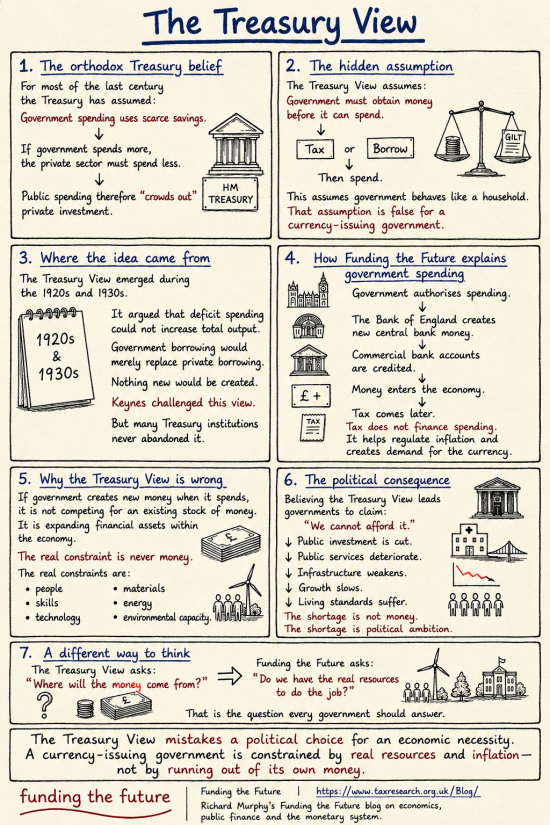
It might have been the first infographic to become the basis for a video. It will not be the last.
Thanks for reading this post.
You can share this post on social media of your choice by clicking these icons:
There are links to this blog's glossary in the above post that explain technical terms used in it. Follow them for more explanations.
You can subscribe to this blog's daily email here.
And if you would like to support this blog you can, here:

 Buy me a coffee!

Yet again, might it be that the Treasury view can be placed on a spectrum between ignorance and self/particular group interests?
If so, might the particular self-interest group/s include the finance industry/rentiers?
These infographics are really good Richard.
Whilst reading Cory Doctows blog this morning, this quote stood out for me explaining succinctly why the thinking behind Treasury Brain and it’s ilk still reign supreme and displaying a reluctance to look at the reality:
Doctorow writes: “As Upton Sinclair famously quipped, “It is difficult to get a man to understand something, when his salary depends on his not understanding it.””
Sinclair was right
Hi Richard, I’m enjoying these new infographics – a very useful addition.
One request: currently, after all your work, and welcome consideration of viewers’ needs, the graphic is, for my old eyes, too small to read comfortably, and enlarging it only results in larger, blocky text.
Rather than using a pixel-based .png format, are you able to save the file in a vector format like .svg Or could AI produce it in .svg format in the first place?
If you can, not only will readers be able to enlarge the image without losing quality, the file will print clearly at ANY size — perfect for a poster at school, work, maybe even the pub 🙂
.svg have therir own problems
WordPress does not easily embed the
And I am not sure then how people will download them.
Have you considered an ALT Text version’?
Where?
How?
All this material is on the blog already, so what are you requesting, specifically?
Might you show me examples?
I believe there is a WordPress plugin – SafeSVG – which will allow SVG files to be added (but I’ve not used it so can’t confirm how easy it is to use).
Alternatively, would a PDF in your download area be an option?
We are going to do the PDFs – I have been in hospital this week
Give us time…
Alt text is a textual description of the visual content and function of an image. It is read out loud by screen readers. My computer recognizers the infographic as a graphic without associated description.
i apologize if it is there but my computer fails to recognize it.
Details on alt text
https://accessibility.huit.harvard.edu/describe-content-images
I try to do this on Twitter etc.
I am not sure how to do it on WordPress. It is not a function I have ever seen, but I will look.
Thanks. I can see what I can find out too.
If you press CTRL and Plus on your keyboard your browser should magnify the page every time you do this. Press CTRL and Zero together this puts the screen back to normal. I can get to at least 2 times the size.
Thanks
Visually, these are brilliant. I read a lot of books, but rarely allow myself the time to read anything else properly (I tend to skim, without absorbing) These excellent nuggets are perfect for stopping and examining the meaning of each box. Thanks
Thank you
Excellent! I’m spreading that one far and wide. I really do think these infographics make telling the story a lot easier. A bit like reading Rupert the Bear books when I was a ki!
🙂
Richard, I’d much rather have you rested and well than any number of PDFs 🙂
Excellent summary even for me who got a U in O Level Economics in 1980 , U being short for unclassified and probably meaning that I got credited with one or two percent for writing my name with no spelling errors .
Thanks
And respect!